PoE 2 Controller Settings: How to Switch Input Method on PC
 Trust Me ·
Switch PoE 2 between Click to Move, WASD and Controller in Options → Input, and what to check when your pad isn't detected.
How do you play PoE 2 with a controller on PC?
Where is the input setting?
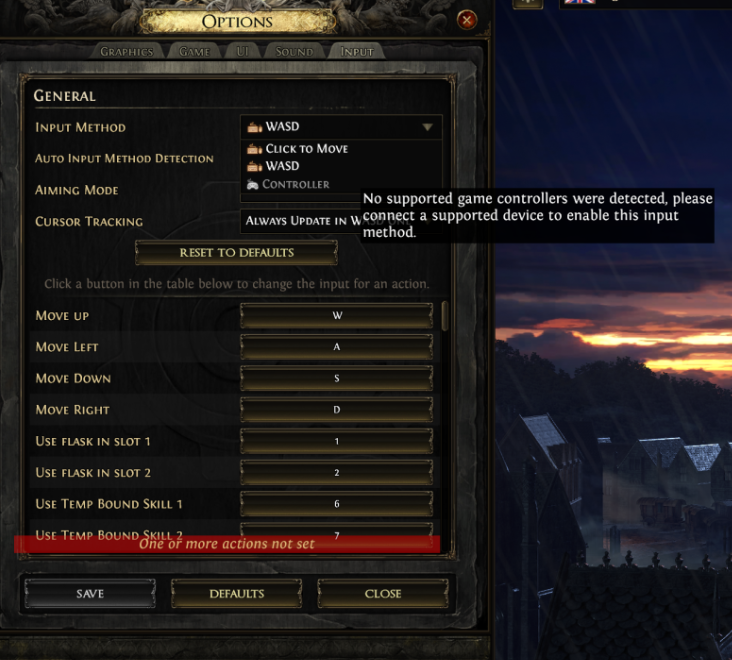
Options (hotkey O), Input tab, General block at the top. Input Method is the first line. Under it sit Auto Input Method Detection, Aiming Mode and Cursor Tracking, then the full key bind list.
Which input method should you pick?
| Input Method | You move with | Good for |
|---|---|---|
| Click to Move | Mouse clicks | Classic ARPG players |
| WASD | W, A, S, D keys | Dodging while you aim |
| Controller | Left stick | Couch play |
Swapping between pad and keyboard a lot? Look at Auto Input Method Detection, right under Input Method.
Why is Controller greyed out?
The game hasn't found a supported pad. Plug it in (or pair it) before you open Options, then open the dropdown again. Still grey? Check the pad works in another game, then restart PoE 2 with it already connected.
Does PoE 2 have cross-play?
Yes, across supported platforms. Purchases are the exception: PlayStation purchases stay on PlayStation, and purchases made elsewhere don't carry over to it. Check GGG's account FAQ before you buy on a second platform.
Controller players get trade shortcuts too: since 0.5.0, hold Y or Triangle on an item to fill in the trade search.
FAQ
- Can you play PoE 2 with a controller on PC? Yes. Options → Input → Input Method → Controller.
- Why can't I select Controller? No supported pad is detected. Connect it first, then reopen the dropdown.
- Does PoE 2 have WASD movement? Yes. It's one of the three input methods.
Sources
Feature details are checked against official documentation. Checklists and practice suggestions are written by Vtomes.
- Options, Input tab (Vtomes capture, Nov 25, 2026)
- Account and cross-play FAQ
- Content Update 0.5.0 patch notes
- ExileCon launch announcement
Image sources: Vtomes · Path of Exile 2 © Grinding Gear Games.
About the author
Trust Me
Started gaming 24 years ago by bullying chickens. These days it's gods in FFXIV Ultimates, and they hit back. Loves exploring every corner of the long deep dungeons and hunting elite marks on the moon, and is now riding the hype train for Evercold.
More guides by Trust Me